

Meet Cortex, the Internal AI Platform That Helps Build Itself
Cortex answers compliance questions, triages its own bugs and opens merge requests against its own codebase. Here's how a small team built it in seven months, how we keep it honest, and why being an identity company made it harder.

Every weekday at 9am, a routine called Daily Feedback Triage wakes up. It reads every answer that someone gave a 👎 the day before, opens the full conversation, works out whether the problem was a missing document, a broken tool or a bad answer, and files a Jira ticket when it finds a real bug. Some of those tickets are later picked up by the same agent, which clones the repository into a sandbox, writes the fix, runs the tests and opens a merge request.
The agent doing all of this is Cortex, our internal AI platform. The repository it’s fixing is its own.
This post covers how Cortex is put together, what it took to make it trustworthy enough for an identity company, and the loop that lets it help build itself.
What Cortex is
Cortex is an AI agent with access to our company knowledge and our tools. You can reach it from Slack, a web app, a CLI, and over MCP from Cursor, VS Code or Claude Desktop. It’s written in Python on PydanticAI, runs Claude models on AWS Bedrock, and is deployed on our own Kubernetes clusters.
In a typical week, a compliance manager asks whether a feature meets a specific regulation and gets an answer that cites our actual certifications. A sales engineer drafts answers to a customer’s security questionnaire in minutes instead of a day. A new engineer asks what a service does and who owns it, without digging through Confluence. An on-call engineer asks why a pipeline is failing and gets the failing job, the likely cause and the runbook.
The first commit landed in late February 2026. Seven months and over 2,000 commits later it has 29 skills, six kinds of routine trigger, a sandboxed coding environment, and an evaluation pipeline that can block a merge. A handful of engineers contributed, but a large share of the code was written by AI agents, Cortex included. More on that later.
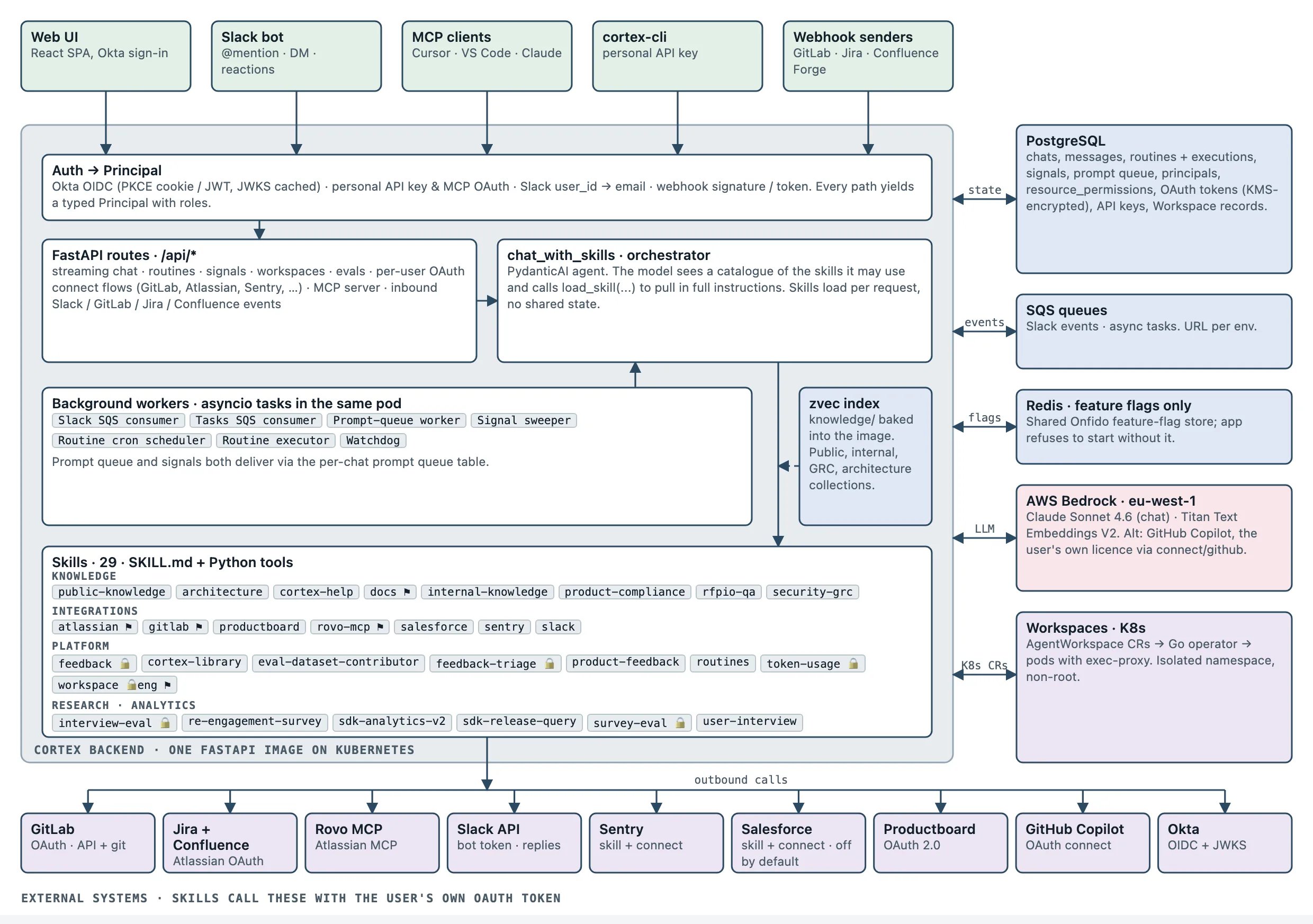
Everything runs as one service. The Slack consumer, routine scheduler and signal sweeper are background tasks inside the same FastAPI app. That keeps a small team fast, and PostgreSQL does the coordination: leader election for cron jobs, row locking for routine execution, and a per-chat prompt queue.
Why identity makes this harder
Ask a generic AI assistant “are we NIST 800-63 IAL2 certified for this flow?” and you’ll get a confident answer. If it’s wrong and a customer relies on it, that’s a contractual problem.
Three constraints shaped almost every design decision.
Answers have to be grounded and cautious. Our compliance-facing skills (security-grc, product-compliance, and an RFP library of around 1,800 approved Q&A pairs) are told to cite their source, flag answers that depend on jurisdiction or date, and send uncertain questions to the risk and compliance channel instead of guessing. The RFP skill always cross-checks the library answer against current documentation, because the cost of repeating a stale answer is high.
The agent acts as you, never as itself. When Cortex reads a Jira ticket, comments on a merge request or posts in Slack, it uses your OAuth token for that service. There is no all-powerful service account. The agent can only see what you can see, and the audit trail in every downstream system shows a real person. If you haven’t connected a service, a routine stops in a needs_input state rather than finding another way in.
It has to be easy to switch off. Cortex has a documented kill switch: a single feature flag that takes it offline for every user within seconds. Shared chats and routines are controlled by an access-control table that rejects any rule it doesn’t recognise. The coding sandbox (below) runs as non-root in its own Kubernetes namespace. These are standard controls, and we needed all of them in place before letting the agent act on its own.
Skills: knowledge the model loads when it needs it
The hardest part of building a useful agent is giving the model the right context at the right time.
Cortex uses Agent Skills: each skill is a SKILL.md with instructions for the model, plus optional Python tools. The model only sees a one-line description of each skill the current user may use, and loads the full instructions when a question needs them. A question about SOC 2 loads security-grc. A question about a failing pipeline loads gitlab. Everything else stays out of the context window.
That progressive loading is what lets the skill count grow without every answer getting worse. It also means a skill is mostly writing: the architecture skill’s instructions spend more words on how to interpret our service catalogue than on the search tool itself. We review SKILL.md changes as carefully as Python changes, because they decide whether the agent is any good.
Access is decided per user. Admin-only skills (such as the ones that read user feedback) never appear for anyone else. Adding a skill is a new directory and, if it needs restricted access, a one-line policy entry.
Knowledge: a vector index built into the image
Search-style skills sit on top of an embedding index. It covers our public developer docs and OpenAPI spec, the building blocks of Entrust Workflow Studio (our no-code tool for designing identity verification flows), internal Confluence pages, on-call runbooks, and an overview of every service.
We also had to decide where that index lives. A separate knowledge pipeline exports everything to Git as Markdown. On every Cortex CI run we embed only the chunks whose content has changed, and bake the resulting index into the Docker image. Cortex never calls Confluence while it’s answering a question.
We chose this on purpose. Every deployed image has a fixed, reproducible view of our knowledge, which helps when an evaluation run needs to explain why yesterday’s answer was different. Retrieval is a local lookup. The cost is freshness: the index is only as new as the last deploy. For things that change by the minute (Jira tickets, pipelines, Sentry issues), skills skip the index and call the live API as the user.
Routines: from chat to background work
Chat is reactive. Nothing happens until someone asks. Routines remove that limit.
A routine is a saved prompt plus a trigger, with an optional allow-list of the skills and tools it may use. When the trigger fires, Cortex starts a normal agent session (same skills, same OAuth tokens as its owner) and runs the prompt without a human present. Triggers include:
- a cron schedule
- a webhook
- a Slack emoji reaction on any message
- a message in a watched Slack channel, optionally filtered by regex or author
- a Confluence page event (via a Forge app)
- a GitLab project event (push, merge request, pipeline and so on), where Cortex registers the webhook for you
You don’t fill in a form to create one. You describe what you want in chat (“every Monday, summarise open CORTEX tickets and post the digest to #squad-cortex”), and Cortex drafts the prompt, confirms it with you and sets up the trigger.
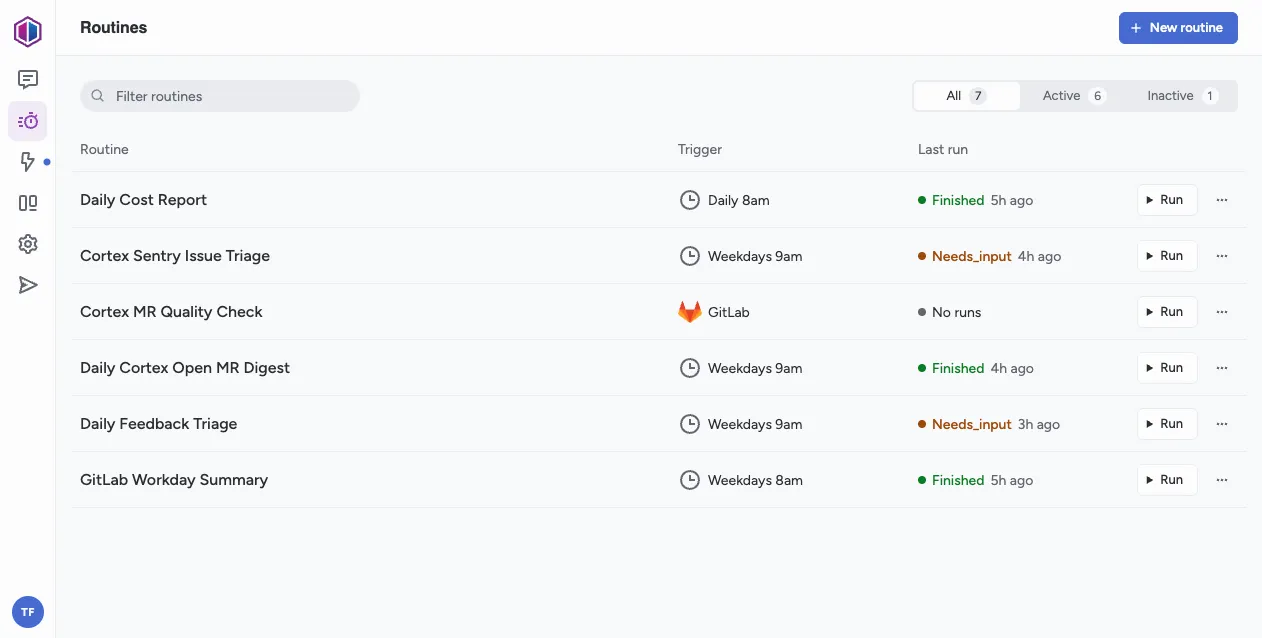
The routines above are ones the Cortex team runs on Cortex itself. Two of them show needs_input because their owner’s OAuth token had expired. That’s the per-user model working as intended, even if it’s a little inconvenient.
Routines start new work. Sometimes a conversation needs to wait instead. Say Cortex has just opened a merge request for you, and you reply “let me know once it’s approved”. Nobody wants an agent polling GitLab every minute, so the conversation registers a signal on that merge request and goes to sleep. When GitLab’s webhooks report activity, Cortex groups the burst of events together, checks the merge request’s current state (approvals, pipeline, new comments) and resumes the same conversation with a short summary. The agent picks up where it left off, with the full history of why it was waiting.
Signals and routine triggers look alike, since both mean “do something when X happens”. We use two different words on purpose, because they do opposite things:
- A trigger starts something new. It spawns a fresh execution of a routine, with a new conversation and no memory of earlier runs.
- A signal brings back something that’s already running. It resumes a paused chat or routine execution in the same thread, with its full history, as if the user had just replied.
Keeping the names separate matters for the model as much as for people. When Cortex decides whether “tell me when this is approved” means “set up a new routine” or “wait here”, the words in its instructions point it to the right one.
Time-based signals (“check back in an hour”) are live today. Merge request signals are the next type to land, followed by Slack replies, Jira issues and Confluence pages.
Workspaces: giving the agent a real machine
The GitLab skill can read and change code through the API, but it can’t run anything. Fixing a bug means running the tests.
Workspaces give Cortex a sandbox: a set of Kubernetes pods on shared storage, created on demand by a small operator we wrote. A tiny Go server is copied into every pod at start-up, so the agent can run commands in whatever image the repository needs (Python, Node, anything) without us building a special image for each project. Each workspace gets its own access token from the operator, lives in a dedicated namespace and runs as non-root.
Cortex picks the image by reading the repository’s own AGENTS.md, CI config or lockfiles. It clones the repo using your GitLab identity, edits, runs commands, checks exit codes, and keeps going until the tests pass. Then it pushes a branch and opens a merge request for a human to review.
How we know it’s right
LLM output is hard to unit-test, so Cortex has an evaluation pipeline that sits in CI next to the linters and unit tests.
We keep a curated set of questions with reference answers and scoring criteria. On every relevant merge request, Cortex answers each question three times. An LLM judge scores each answer against the reference twice, and the scores are averaged to smooth out noise from both sides. If any question scores below 2.5 out of 5 on any criterion, the pipeline fails and the merge request can’t be merged. A nightly run on main adds a report written by an analyser agent and publishes it with a running changelog, so we can see quality drift between releases instead of hearing about it in Slack.
Anyone can add evaluation questions: Cortex helps write them and opens a draft merge request with the change. The people who know what a correct compliance answer looks like are the ones who write the tests for it.
The loop: how Cortex helps build itself
Put those pieces together and you get a loop:
- Gaps get recorded automatically. When a knowledge search finds nothing relevant, Cortex logs a knowledge gap along with the question. A 👎 on an answer is stored with the full conversation.
- A routine triages them. Daily Feedback Triage reads the 👎s, sorts them by theme and files Jira bugs. Sentry Issue Triage does the same for runtime errors.
- The agent proposes fixes. Missing knowledge becomes a merge request against a docs repository through the
docsskill. Code bugs go to a workspace, which produces a merge request against Cortex. - Quality gates check the fix. Linting, type-checking, unit tests and the evaluation suite run on the merge request, and the MR Quality Check routine checks that the linked ticket’s requirements are actually met.
- A human merges. Every change still gets a human review. The agent proposes and people decide.
This only works because the codebase is written for AI agents to read. Our AGENTS.md opens with “AI agents: read this file before writing any code” and lists the exact lint, format, type-check and test commands CI runs, because generic training data will confidently suggest the wrong ones. Every skill’s SKILL.md explains how to extend it. A scaffolding skill generates new skills in the right shape. The team’s job has moved from writing most of the code to designing the architecture, writing instructions, reviewing and building evaluations.
Cortex even runs its own user research. A dedicated interview mode holds asynchronous UX interviews with colleagues, and a matching admin skill summarises the results (net promoter score, themes, friction points) so we can decide what to build next.
What’s next
Most of the knowledge Cortex uses still starts life in Confluence and gets exported. We’re moving more of it the other way: Markdown in Git as the source of truth, reviewed through merge requests, edited by people and by the agent, and indexed on the next deploy. Every skill, routine and runbook becomes a file someone can read, question and improve.
The more of that loop runs without being asked, the more the team can focus on the parts that need human judgement.
We’re hiring. If building agents that are held to identity-industry standards sounds like your kind of problem, take a look at our open roles.